Global visionaries headline the premier open source event in Europe to share on OSS adoption in Europe, driving the circular economy, finding inspiration through the pandemic, supply chain security and more. SAN FRANCISCO, August 4, 2022 — The Linux Foundation, the nonprofit organization enabling mass innovation through open source, today announced the keynote speakers for […]
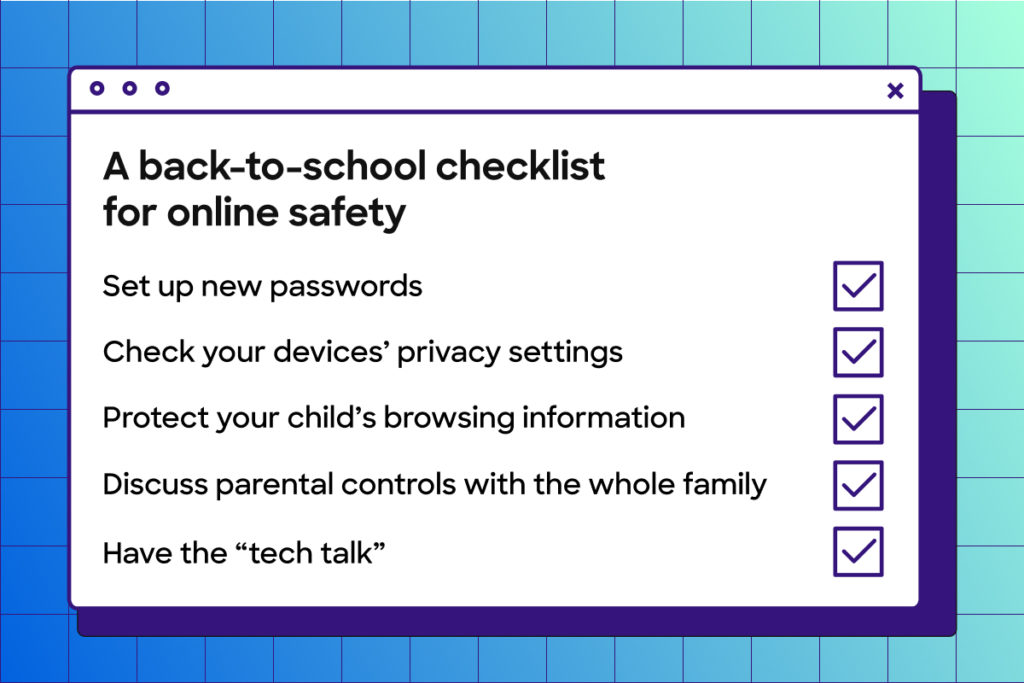
The first day of school is right around the corner. Whether that brings some relief, gives you jitters or both, we’re here to support families with one major thing: internet safety. For parents, thinking about the dangers of the web can be scary. But it doesn’t have to be. While the internet isn’t perfect, it’s […]
MGR, sometimes said to be short for “ManaGeR”, sometimes short for “Munger”, is a simple network transparent window system. It was originally developed for the Sun 3 series of workstations by Stephen Uhler and colleagues beginning in 1984 while at Bellcore (later Telcordia, now part of Ericsson) and later enhanced by many others. The window system ran on many different hardware platforms, at least these: Sun 3/xx workstations running SunOS, which was the the original development platform, Sun SPARCstations (SunOS and then ported by me to Solaris), Intel x86 based PCs (Coherent, Minix, FreeBSD or Linux), Atari ST (under MiNT), AT&T UnixPC (SysV) and the Macintosh. I had never heard of MGR before, so this was a great read.
Please join us for the Moodle Academy webinar “ The accessibility of opportunity and the opportunity of accessibility” on 15th August 12:00 – 13:00 UTC.
In this webinar, Ben Watson, Head of Digital Accessibility at University College London (UCL), will provide an introduction to digital accessibility.
The webinar will cover the basics that we all need to think about when designing digital content to ensure that everyone can have seamless access to it. We will consider some of the common accessibility barriers that can be presented in digital materials and we will also look at a number of free and open-source assistive technologies that everyone can use to improve their online experiences.
This event is for educators and anyone interested in making their course content accessible.
If you need global state management for your app(s) (and you probably do), a relatively new flavour of Redux called Redux Toolkit makes this considerably easier. Redux Toolkit includes a number of functions which make reusing similar “slices” of state quite easy, however there is a missing piece to this puzzle that will make things seamless!
Whilst developing a recent project which utilises an Elasticsearch backend to provide a number of independent search interfaces, a need came up to have very similar state management for each application. In Redux there can only be one store, and we put this to the test with an initial prototype that threw caution to the wind and used a separate store for each application. The choice of using separate stores allowed us to easily reuse React components that implemented Redux’s useSelector hook to retrieve data from the store.
However, it quickly became apparent that Redux had not been designed to work this way. Redux’s excellent dev tools stopped functioning as intended, and the dev tools being a big driving point behind using Redux in the first place – meant we had to rethink our implementation.
The initial build featured a suite of reusable components that each implement useDispatch and useSelector to act on their independent state management. Take a Pagination component for example. It needs to keep track of which page a user is currently on, as well as update the current page. A useSelector hook allows it to retrieve the current page, and a useDispatch hook allows it to call an action which updates the current page.
Our architecture has a top level App component which is unique for each search application. It acts as a container and wraps the layout and components. In our initial prototype it implemented it’s own store and Redux’s Provider component so the child components could implement Redux hooks directly.
So with a shared store, this architecture was at risk of becoming very complex. The App wrapper would need to implement the hooks and actions itself, and then pass them down via Context or props so child components could access the correct data and actions in the store.
Instead of doing this we came up with something new.
The architecture
The updated architecture uses a React Context Provider to pass the applications “slice” down via Context. Then a custom useContext hook allows each reusable component to access store data and actions for that slice, without needing to be aware of which slice they are part of.
Let’s look at it from the top.
A single global store is broken up into slices using the Redux Toolkit createSlice function. Each slice has its own name, initial state, reducers and actions.
Each application has it’s own container which implements a Context provider called SliceProvider, which imports the slice and allows that to be accessed across the application.
All child components can then be shared and access the state slice via a series of custom hooks that implement useContext.
When you view things through Redux Dev tools, this is what it looks like:
Demonstration
To take a look at things I’ve spun up an example application, with two search interfaces – a “global” search and an “image” search.
The index.js looks like this, All it’s doing is wrapping everything in the Redux `Provider`:
If you haven’t used Redux Toolkit yet, this simplified syntax for reducers makes it a clear winner. Also there is no need to use the Redux Toolkit createReducer function, as that is called below with createSlice.
Creating slices
Let’s take a look at slices.js which creates each slice via a function which lets us:
Define a default “initialState” for each slice.
Define a set of default reducers for each slice.
Takes an argument for initialState to override certain values.
Takes an argument for reducers so we can add to the default reducers – if one application has more advanced features for example.
Includes a way to pass through extraReducers (more on this later).
import { createSlice } from"@reduxjs/toolkit"import {
updateCurrentPage,
updateResultsPerPage,
} from"./reducers";
const createSearchAppSlice = ({ name, initialState, reducers, extraReducers }) => {
// Setup a default state, and allow the function arg to change the defaults.
initialState = {
currentPage: 1,
resultsPerPage: 10,
...initialState
}
return createSlice({
name,
initialState,
reducers: {
// The first reducer is a utility to reset the state.
reset: () => ({ ...initialState }),
// Our reusable reducers will go here...
updateCurrentPage,
updateResultsPerPage,
// Then pass through any other reducers specific to this slice only.
...reducers,
},
extraReducers: {
// extraReducers are global reducers that apply to all slices.// We'll come back to these later.
...extraReducers,
},
})
}
// The global slice uses the default function.exportconst globalSearchSlice = createSearchAppSlice({
name: "globalSearch",
})
// The image slice changes some of the defaults.exportconst imageSearchSlice = createSearchAppSlice({
name: "imageSearch",
initialState: {
resultsPerPage: 20,
}
})
This approach makes slice creation reusable but extensible.
The store
Our store.js makes use of combineReducers to add our slices.
And because our components are wrapped in a SliceProvider, the useSliceActions hook allows access to the actions and the useSliceSelector hook allows access to the slice store data (via the Redux useSelector hook).
Now both applications can share child components that provide totally unique sets of data and actions from each slice!
Using extraReducers
Now let’s take things a step further and come back to the extraReducers piece I touched on above. In Redux Toolkit extraReducers are a way to listen to actions across all slices – meaning we can call an action in one place and have it update data everywhere!
To do this we need to define some actions in actions.js:
LISLE, IL., August 3, 2022 — The American Association of Insurance Services (AAIS) and the Linux Foundation welcome Jefferson Braswell as the new Executive Director of the openIDL Project. “AAIS is excited about the expansion of openIDL in the insurance space and the addition of Jefferson as Executive Director signals even more strength and momentum […]
There are five common stages of the OSPOs that identify the status of your organization’s involvement in Open Source: use it as suggestions to advance your Open Source journey.
We use cookies on our website to give you the most relevant experience by remembering your preferences and repeat visits. By clicking “Accept All”, you consent to the use of ALL the cookies. However, you may visit "Cookie Settings" to provide a controlled consent.
This website uses cookies to improve your experience while you navigate through the website. Out of these, the cookies that are categorized as necessary are stored on your browser as they are essential for the working of basic functionalities of the website. We also use third-party cookies that help us analyze and understand how you use this website. These cookies will be stored in your browser only with your consent. You also have the option to opt-out of these cookies. But opting out of some of these cookies may affect your browsing experience.
Necessary cookies are absolutely essential for the website to function properly. These cookies ensure basic functionalities and security features of the website, anonymously.
Cookie
Duration
Description
cookielawinfo-checkbox-analytics
11 months
This cookie is set by GDPR Cookie Consent plugin. The cookie is used to store the user consent for the cookies in the category "Analytics".
cookielawinfo-checkbox-functional
11 months
The cookie is set by GDPR cookie consent to record the user consent for the cookies in the category "Functional".
cookielawinfo-checkbox-necessary
11 months
This cookie is set by GDPR Cookie Consent plugin. The cookies is used to store the user consent for the cookies in the category "Necessary".
cookielawinfo-checkbox-others
11 months
This cookie is set by GDPR Cookie Consent plugin. The cookie is used to store the user consent for the cookies in the category "Other.
cookielawinfo-checkbox-performance
11 months
This cookie is set by GDPR Cookie Consent plugin. The cookie is used to store the user consent for the cookies in the category "Performance".
viewed_cookie_policy
11 months
The cookie is set by the GDPR Cookie Consent plugin and is used to store whether or not user has consented to the use of cookies. It does not store any personal data.
Functional cookies help to perform certain functionalities like sharing the content of the website on social media platforms, collect feedbacks, and other third-party features.
Performance cookies are used to understand and analyze the key performance indexes of the website which helps in delivering a better user experience for the visitors.
Analytical cookies are used to understand how visitors interact with the website. These cookies help provide information on metrics the number of visitors, bounce rate, traffic source, etc.
Advertisement cookies are used to provide visitors with relevant ads and marketing campaigns. These cookies track visitors across websites and collect information to provide customized ads.