
How Chrome achieved high scores on three browser benchmarks

How Chrome achieved high scores on three browser benchmarks

How Chrome achieved high scores on three browser benchmarks


Since the beginning of Chrome, benchmarks have been a key way by which we drive performance optimizations that benefit users. The most relevant web benchmarks today are Speedometer, MotionMark, and Jetstream. Over the last year Chrome has invested in optimizing against these specific benchmarks and has just achieved our highest scores across all three. These gains were achieved through a combination of large projects and small improvements. In today’s The Fast and the Curious post, we want to share just some of the ways we drove these improvements in Chrome.

Announcing our brand new mid-tier compiler: Maglev 

We’re bringing a new mid-tier compiler to Chrome. Maglev is a just-in-time compiler that can quickly generate performant machine code for all relevant functions within the first one-hundredth of a second. It reduces overall CPU time to compile code while also saving battery life. Our measurements show Maglev has provided a 7.5 percent improvement on Jetstream and a 5 percent improvement in Speedometer. Maglev will start rolling out in Chrome version 114, which begins release on June 5.

Speedometer 

Speedometer measures the responsiveness of websites by putting various JavaScript UI frameworks through their paces. Just over a year ago we shared details about how we increased our score from 100 to over 300 from Chrome version 40 to version 101. Since then, across 13 Chrome releases, we’ve achieved our new highest Speedometer score of 491. In addition to Maglev, the V8 team has achieved this score through both small adjustments, such as optimized function calls, and major, multi-quarter projects. 
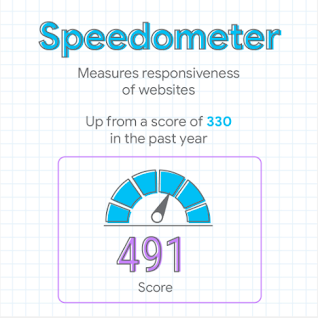
A speedometer visual shows a 491 score for the Speedometer browser benchmark, which measures the responsiveness of websites. This is up from a score of 330 in the past year for Chrome.

Chrome 116.0.5803.2 running on an M2 Macbook Air with Maglev enabled

MotionMark

MotionMark is designed to test how much browser graphics systems can render at high frame rates. Chrome’s graphics and rendering teams have tracked over 20 optimizations since the start of the year, and more than half are available today. Together, these optimizations have almost tripled performance. Some highlights include improvements to Canvas performance, profile-guided optimization, GPU task scheduling, and layer compositing. We also created a novel algorithm for dynamic multisample anti-aliasing and out-of-process 2D canvas rasterization for improved parallelism.
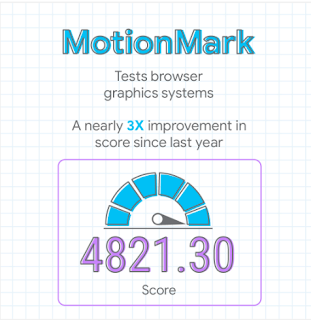
A speedometer visual shows a 4821.30 score for the MotionMark browser benchmark, which tests browser graphics systems. This marks a nearly 3X improvement in the last year for Chrome.

Chrome M115.0.5773.4 running on a 13” M2 Macbook Pro


Jetstream 

JetStream is a JavaScript and WebAssembly benchmark suite focused on advanced web applications. Many of the updates that we made for Speedometer also drove significant improvements on Jetstream as we optimized the V8 engine. In addition to these enhancements, Maglev drove the biggest gains in this benchmark. 
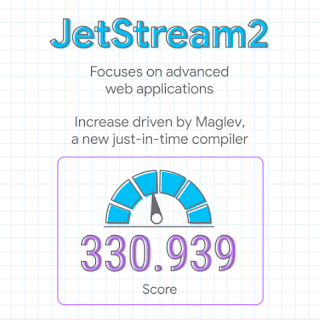
A speedometer visual shows a 330.939 score for the Jetstream2 browser benchmark, which focuses on advanced web applications. This improvement is largely driven by Maglev, a new just-in-time compiler in Chrome.

Chrome 116.0.5803.2 running on an M2 Macbook Air with Maglev enabled


Looking ahead


Because we’re optimizing against these benchmarks, it’s essential that these improvements translate to real user benefits, which is why we’re investing, along with other browsers, in creating the next generation of benchmarks. This has been an ongoing collaboration, and we’re excited to turn our efforts toward this new target in the coming year.


We hope you all enjoy a faster Chrome! 


Posted by Thomas Nattestad, Product Manager

ArcaOS 5.0.8 released

ArcaOS 5.0.8 includes refreshed driver content, updated kernel and included software, as well as installation boot fixes since 5.0.7 was released at the end of 2021. It also rolls in a few fixes that come from our 5.1.0 development work. ArcaOS 5.0.8 can be used for new installs or to update any prior version of ArcaOS 5. If you have experienced difficulty installing previous releases of ArcaOS on your hardware, 5.0.8 may address your issue(s). This is a small point release in the run-up to the release of ArcaOS 5.1.0, which will be a much bigger update, but that is currently held back by the developers having to redesign their ISO delivery stack. The wiki has all the detailed changes since 5.0.7.

How to CODE a Search Menu using HTML5, CSS3 & JavaScript | New

Video by via Dailymotion Source How to Create a Search Menu using HTML5, CSS3 & JavaScript | New #SearchMenu #HTMLandCSS #ComputerScienceVideos Social Media:——————————–Twitter: https://twitter.com/ComputerVideosInstagram: https://www.instagram.com/computer.science.videos/YouTube: https://www.youtube.com/c/ComputerScienceVideos CSV GitHub: https://github.com/ComputerScienceVideosPersonal GitHub: https://github.com/RehanAbdullah——————————–Contact via e-mail——————————–Business E-Mail: ComputerScienceVideosBusiness@gmail.comPersonal E-Mail: rehan2209@gmail.com © Computer Science Videos 2020 Go to Source

Camtasia Mastery (Volume 1): Unleashing Your Video Editing Potential – Part 2

Video by via Dailymotion Source This complete training tutorial is divided into Two parts. In this in-depth training tutorial, join me as I dive into the world of Camtasia, a powerful video editing software that allows you to create professional-quality videos with ease. Whether you’re a beginner or an experienced editor looking to enhance your … Read more

US President Joe Biden Trips And Falls During Air Force Academy Graduation Ceremony _ V6 Digital

Video by via Dailymotion Source కాలు జారీ పడిన అమెరికా అధ్యక్షుడు జో బైడన్ | V6 News Watch Teenmaar Full Episode • KCR-Brahmin Sadan… బ్రాహ్మణులకు ఖుషీ ముచ్చట • CM KCR Participat… ముస్లిం బంధు పెట్టాలే ముందు పాతబస్తీ దాటు • War Of Words Betw… తాగుడులో తెలంగాణ రికార్డు • Beer Sales Create… ప్రశ్నించిందని పింఛిన్ కట్ • MLA Redya Naik Or… … Read more

How To Create Text OUTLINE Effect in Photoshop | Outline Text Border Effect in Photoshop in Hindi

Video by via Dailymotion Source How To Create Text OUTLINE Effect in Photoshop | Outline Text Border Effect in Photoshop in HindiMake sure to watch carefully to the end, and then write in the comment section the most valuable information you find it in the tutorial. ______Thanks to watching this video, don’t forget to subscribe … Read more